Site Redesign May 2012 part 2: Styling HTML5 search inputs and little icons

Haven’t written about this for a while, but I’m still working on it!  Here is the GitHub repository, and here is the progress.

I decided to use the new HTML5 “search” input type with a placeholder.  I think it’s neat – in Chrome and Safari, when you type something, there is an “x” added you can click to clear the text.  Placeholder works in my Chrome, Safari, Firefox, and Opera, but not IE (was not surprised).  I wanted to center the text in the search box, but “text-align: center” didn’t seem to affect the placeholder text for Safari.  I found a “::-webkit-input-placeholder” selector, but unfortunately, “text-align: center” on the placeholder text specifically still didn’t work.  It was odd to have the placeholder text left-aligned, but the text typed in centered, so I decided to just leave the text left-aligned.

It was also pretty annoying trying to style the input box in the first place, because nothing seemed to affect the style in Chrome or Safari.  I found a Stack Overflow question that was pretty enlightening: HTML5 Search Input: No Background Image in Chrome?  Apparently, the browsers that support the “search” input type (WebKit – Chrome and Safari) apply their own special styling, which is not currently accessible.  The other browsers don’t support “search”, so they just style the input like normal “text” types.  A solution in the answers was to use “-webkit-appearance: none” to clear the default styling.  Worked for me!

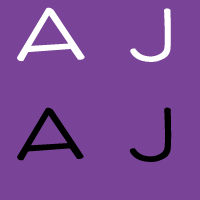
Also made my little icons and author icons into sprite sheets (except the search ones – I think you won’t be able to see the second search one because it’s black), plus a favicon (look up)!


I think I’ll be editing the third (largest) layout version, based on feedback.  Not sure what I’ll do yet.

Site Redesign May 2012 part 1: My approach

I’m finally redesigning this site!  I’m putting it on GitHub for version control, but also because I think it’s neat to be able to learn from others’ source code.  Here is the repository.  In addition to fully commenting everything, I’m keeping notes on sites I find really useful while I’m working on this.

I’m attempting a responsive design (read Responsive Web Design!  It’s awesome).  I’ve decided to do basic layout structuring for three different layouts (small, normal, big) in stand-alone stylesheets first, then build up with media queries from the small one to the big one (my attempt at mobile-first).  So far I’ve done the normal and the small.  Next is to do the big layout, then combine them into one stylesheet with media queries so it’s actually responsive.  Then, add real styles instead of this ugly temporary yellow boxy look.  And finally… the part I’m unsure about… is integrating this with WordPress.  We’ll see!

I really like Media Queries, which is where I’m getting a lot of inspiration for responsive designs.  I’ve taken to resizing nearly every site I come across now, to see if it’s responsive.  That’s how I found the awesome little detail on CSS-Tricks – the narrower the width, the more worried the frog gets!  See for yourself!

I also wanted to note that HTML5 Boilerplate is awesome.  I’m not using it, because it’s a little too full-featured for me (I want to learn and start from the basics on my own instead of using a whole pre-built structure right now), but the comments in it are so useful and great to learn from.  I’m starting reading source code a lot more lately.  Which reminds me, I remember back when I was playing around with websites in middle school, there was that trend of disallowing right-click so that people couldn’t “steal” images or source code…  Things have changed so much now, there are even ads in source code!  Check it out – look at this source code of Blacktie.  I have no idea what that site is (I found it through HTML5 Gallery), and I found that source code ad on accident, but I think it’s awesome despite the fact that it’s an ad.  It’s an interesting way to get to your target audience!

Infinite Parallax Experiment part 4: Images added, done for now!

GitHub repository, view experiment here.

I’m “done” as much as a random experiment can be done.  I’ve got a parallax effect based on mouse movement – I still can’t really figure out the best movements to make it look more 3D – and clicking on the landscape moves you “forward”.

My images are kind of retarded looking :( The overall effect is kind of confusing; I think I tried to put too many levels, so there’s too much going on at once.  I originally had this really complicated background too, with mini trees and bushes and mushrooms, but it didn’t make sense for that to stay so still while the other levels were moving forward.  Also, I didn’t draw that many possible images, so when they’re randomly selected, they repeat a lot.  It looks cool when they move forward on click though.

Oh well!  It was a fun experiment and I learned a lot.  Most importantly that I’m really bad at anything graphics related and should leave that to other people.

Now, on to use what I’ve learned to redesign BaconFriedRice!

Repetition in the landscape

My 6 possible images


Infinite Parallax Experiment part 3: Animated moving forward

GitHub repository, progress so far.

I’ve got it to “move forward” when you click, and today I animated it.

Originally I was moving forward by just moving the images into the level in front of it.  The levels are stacked divs with different z-indexes, so when I just moved the images into their new levels on click, it was a bit jarring.

The jQuery class I was in had talked about animations, so I decided to try it.  Unfortunately, this meant I had to change how I was doing things.

I assume that all the images I use will be the same size, to make calculating positions easier.  For the two back levels, I had been using transform scale in the stylesheet to make the images smaller.  However, jQuery’s animate function can only animate properties with number values.  This meant that I couldn’t use, say, transform: scale(0.8).  However, I could animate the change in width and height – so I decided to do that instead.

Now, to animate it, I move all the existing images forward a div; the front-most level is moved into a temporary div on top of all the other ones.  When this is done, there is no visual difference.  Then, I fade out and remove the images in the front-most level, animate the change in width, height, and position of the second and third levels, and fade in a new back level.

If the mouse was moved during the animations, there was a bit of weird jerking movement, so I just made it so that the mousemove handler has no effect until the animations are done.  Good thing the jQuery animation functions can take callback functions!

I also changed the temporary images to different temporary images of just numbers.  It’s a bit easier to see the movement, but still kind of weird looking since they don’t have borders.  All that’s left is to draw the actual images though, and then it should be done!  Unless I find some weird bug or think of something else to add to it…

Infinite Parallax Experiment part 2: Adding movement

I’m taking a jQuery class right now through work, and it’s so cool.  You can do so much with it, and it’s so amazing to imagine how much work went into making it all cross-browser-compatible and easy for you to use.  It made me even more excited about playing around with this infinite parallax idea.

Here is the GitHub repository, and here is the progress so far.

I actually worked on it last week, but didn’t have a chance to write about it.  I can’t really remember what I did last week… but today I edited some of my JavaScript based on some jQuery tips I learned in the class, and also added movement to the three levels.  I don’t really know what kind of numbers to use to make it look 3D, so they’re kind of random.  I guess I’ll tweak them after I add the real images, as it’ll be easier to see then.

Next step is to do the “moving forward on click” part!  I learned some stuff today that makes it a lot easier than I thought it would be.  Excited to do that tomorrow!

More notes

Responsive Web Design by Ethan Marcotte

I finished this book a few weeks ago, but never got around to writing about it.  I loved it though!

Ever since I came across the idea of responsive design, I’ve been fascinated with it.  I just think it’s such a neat idea, and it seems so obvious after you hear about it.  After I finish the Infinite Parallax experiment I’m going to make a responsive layout for BaconFriedRice!  Yes, two years later, I’m finally going to actually work on it! (For real!)

Anyway, Responsive Web Design by Ethan Marcotte is amazing, especially because it is written by the guy who came up with the idea in the first place.  Just like all the other A Book Apart books, the writing tone is awesome, and the content tells you things you can do to create a responsive site right now.  He shows you how to do it by creating an example page that you can actually go view and play around with.

One thing I really like that Marcotte says is that a web designer’s canvas is the browser (page 3).  However, unlike other art mediums where the canvas is precisely selected beforehand, the browser continually changes, and you can’t rely on a consistent format, which make web design pretty challenging.  I’ve never thought of it that way before, but now I view it all in a whole new way.

Marcotte sees three ingredients of responsive web design, and breaks up the chapters accordingly: 1) a flexible, grid-based layout, 2) flexible images and media, and 3) media queries (page 9).  I won’t go too much into exactly what he says in the book, but I found it extremely helpful.  He breaks down the steps he takes to make a layout responsive, which makes it pretty easy to follow, and it seems like it’s not too hard to break into creating responsive designs.

Basically: read this book!

Also, he made an “over 9000” joke :) He put comments above some media query breakpoint examples: “Default, linear layout”, “Small screen!”, “Desktop”… and “IT’S OVER 9000”!

Just read it!

Bacon Flowchart

So one of my friends posted this bacon flowchart on my Facebook wall:

Another friend apparently doesn’t have enough to do at work and made an Allison version:

I have no words for how awesome that is.

Infinite Parallax Experiment part 1: Setting up

I’ve always loved the cute little parallax effects GitHub has on their site.  The three I’m specifically talking about are their About, 404, and 500 pages.  Aren’t they adorable?  These are based on mouse position, where a lot of the common parallax effects seem to be based on the scroll bar.

I showed this to my friend Rosemary a few weeks ago, and she mentioned that it would be cool if it there was even more of a 3D effect by moving you “forward” infinitely, so that whenever you clicked, the front-most layer disappeared, the other layers moved forward, and there were new elements in the back layer.  It’s been on my mind since then, so I decided to play around with it and make it a quick little experiment.

So far it’s also been a good chance for me to become more familiar with GitHub (and Git!) and jQuery.  I’m putting the source for this experiment in this infinite-parallax GitHub repository, and you can see what I’ve done so far here: Infinite Parallax.

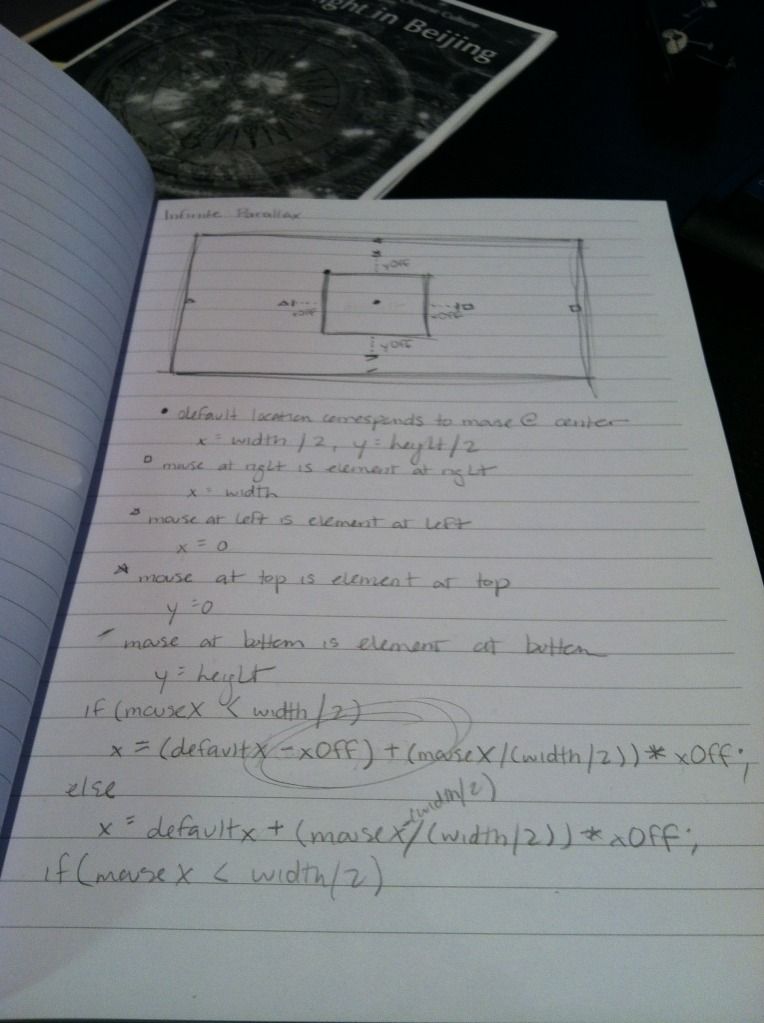
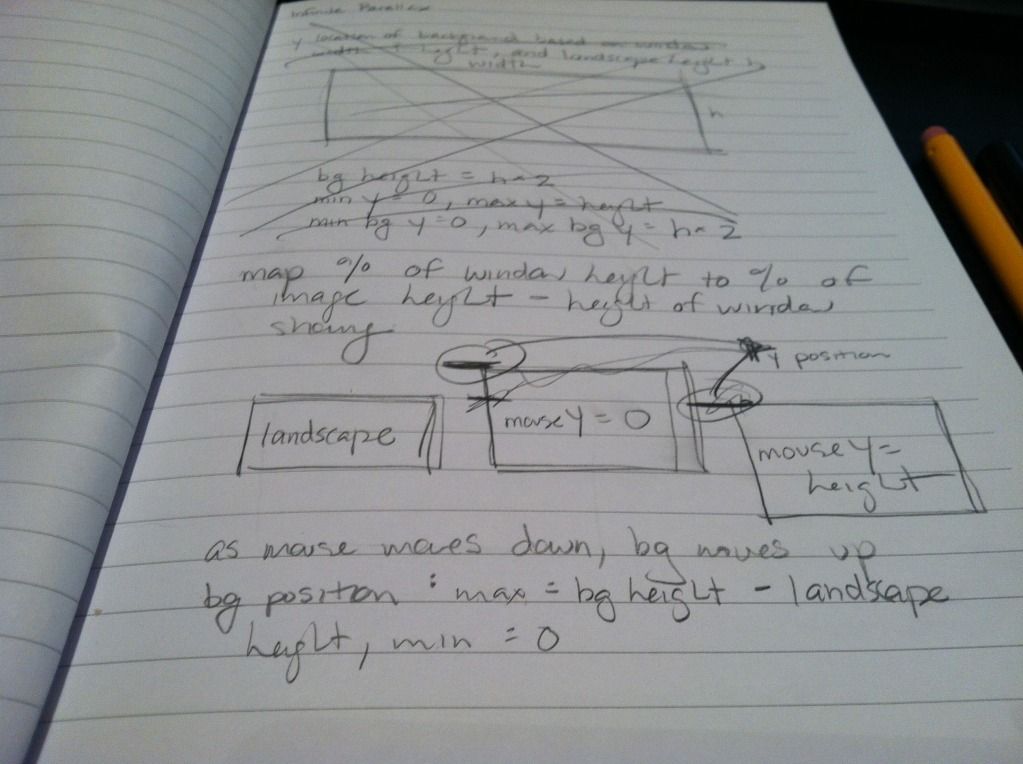
It isn’t much yet.  So far I’ve just made a test background image for the landscape, and had the image move around based on the mouse position.  When the mouse is at the top of the window, it shows the top of the background image, and as the mouse moves down, the background image moves up, so that when the mouse is at the bottom of the window, it shows the bottom of the background image.  The x-movement is kind of arbitrary right now, as I don’t know what the final image will be, and it will probably need to be tweaked based on that.

My scribbly notes

My scribbly notes

Clicking on the landscape just pops up a temporary alert I put in the function where I will be manipulating the different layers of images.  I still have my test numbers in there, so right now the landscape is showing mouseX, mouseY, and the x-position of the background image.

Next step I’m just going to put in three layers of images and play around with the x and y positions to see how far to move them for it to look okay.  Then after that, putting in random images with some random movement offsets on each, and finally removing/moving/adding layers on click!

The hardest thing will be deciding what to theme this experiment and what images to use.  I took a look at my Inspiration Pinterest board, and I think I’ve decided to use the color scheme in this pin.  Maybe a foresty theme with trees and bushes that have purple berries, and some grey bunnies or something.  Who knows!  Rosemary also showed me how to “draw” (…or rather, trace xP) in Illustrator, so I think I’ll sketch simple cute little images and trace them in Illustrator.

My first (messy) tracings!

My first (messy) tracings!

HTML5 For Web Designers by Jeremy Keith, CSS3 For Web Designers by Dan Cederholm

HTML5 For Web Designers by Jeremy Keith and CSS3 For Web Designers by Dan Cederholm are both A Book Apart books.  Even though I just recently read Introducing HTML5 and The Book of CSS3, I wanted to see how HTML5 and CSS3 would be presented “for web designers”.  Introducing HTML5 and The Book of CSS3 go through many new aspects of HTML5 and CSS3, both usable and not quite ready, and they are both really helpful in getting a good grasp of the big picture for both of them.  They both go through different categories of new features, with explanations and some basic examples for each.  They read a bit like textbooks to me, though.

HTML5 For Web Designers and CSS3 For Web Designers take more practical, use-right-now approaches.  They don’t necessarily try to thoroughly cover all the new features, but present the ones that are stable enough for you to use right now.  And both books are so short!  They were easy reads and the authors have really friendly tones.  I’m hoping the other A Book Apart books are similar!

HTML5 For Web Designers starts off with “A Brief History of Markup”.  Some of it is similar to what Introducing HTML5 mentions, but I also learned new things.  It takes a very humorous tone – I liked the following:

After HTML 4.01, the next revision to the language was called XHTML 1.0.  The X stood for “eXtreme” and web developers were required to cross their arms in an X shape when speaking the letter.

No, not really.  The X stood for “eXtensible” and arm crossing was entirely optional. (page 2)

The chapter “The Design of HTML5” was interesting to me, because it gives a background that is more that just historical facts – it gives  a glimpse into the reasoning and principles behind people’s thoughts.  For instance, it talks about some of the WHATWG’s design principles used to guide the development of HTML5.  One that caught my interest was “Priority of constituencies”, which, according to the book, says: “In case of conflict, consider users over authors over implementers over specifiers over theoretical purity” (page 10).  So apparently HTML5 is, at the core, designed for the users.  I often assume this is true for many things, when in fact they are not at all… It’s nice to know HTML5 really is designed that way!

In talking about the very loose syntax of HTML5, I came across this paragraph:

If you’re looking for a cheap evening’s entertainment, get an array of programmers into the same room and utter the words “significant white space.”  You can then spend hours warming yourself by the ensuing flame war. (jpage 15)

First of all, I probably enjoyed the phrase “array of programmers” too much.  Second, it made me try to clarify my own thoughts on white space.  I haven’t yet seriously used a language in which white space is significant (such as Python), so I can’t clearly say what I think about that, but I do know that I really like patterns and structures – any time I code, I try to make my style as consistent as possible everywhere.  I feel like theoretically I would enjoy the strictness of significant white space, but in reality I would probably get pissed off that my code broke due to something tiny I didn’t feel was important at all.

One thing I thought was interesting is the author’s approach to canvas.  I’ve seen people all over the internet so excited about it, treating it like the best thing ever… but this author is not quite as enamored with it, due to its lack of accessibility (page 27).  It’s interesting that he considers that more important than all the “cool stuff” canvas can do.

Another thing I found interesting is when the author is discussing calendar widgets.  He says, “…calendar widgets all do the same thing, but you’ll find that they’re implemented slightly differently on each site.  A native calendar widget would smooth away the inconsistencies and reduce cognitive load during the date-picking process” (page 51).  To me though, I feel like it would be weird because a native widget would be styled by the browser, and may not fit with the overall design of a site.  Which is “better”?  It seems like something would be inconsistent for the user either way, so is there really a “better” way, or is it okay either way?

I actually enjoyed CSS3 For Web Designers more than HTML5 For Web Designers.  The tone is also friendly and humorous, but the approach the author takes to examples is a lot easier to relate to and more interesting.  Also, he (Dan Cederholm) apparently coined the term “bulletproof web design” and created Dribbble (foreword)!

I like his humor a lot – “We created support groups for designers emotionally scarred by inexplicable Internet Explorer bug” (page 2).  He also has an interesting take on the critical and non-critical aspects of a site’s visual experience.  According to him, branding, usability, accessibility, and layout are critical, while interaction, visual rewards, feedback, and movement are non-critical (page 5).  I had never though of splitting aspects of a site in those ways, but with his categorizations, his critical and non-critical aspects mostly make sense to me.  I am surprised that branding is critical (though perhaps he is talking about business sites, while I mostly think of personal sites), and feedback is non-critical (I had figured that would be part of usability).

I liked the way he presented examples, and he takes a very practical, learn-by-trying approach.  For instance, when talking about timing functions in transitions, he says, “If you slept through geometry in high school like I did, don’t worry.  I recommend simply plugging in each of these timing function values to see how they differ” (page 20).  The examples were really fun to follow and made a lot of sense, because he related them all to a fictional case study (page 29).  In fact, he made the fake site available: Things We Left On The Moon.

The author brings up a good question – do websites need to be experienced exactly the same way in every browser (page 35)?  His answer is no.  From what I understand, he believes that the most basic functionality should work in every browser, but extras on top of that are not required, and you should design your site so that it degrades gracefully.  For example, if a browser can’t display the transition of text from one color to another, fine!  Just have it change color – the transition is not so important.   I think that I agree with him, although I may not agree with which exactly what aspects he thinks are important.

Also, fun fact I learned from the book – parallax scrolling originated in an arcade game (page 84)!

It may seem like I recommend every book I read ever, but that might also be because I give up and don’t finish books I wouldn’t recommend.  I definitely recommend these two books.  Originally I had been debating whether I should purchase them or not, since I already had the other books about HTML5 and CSS3.  I’m glad I did though, because although a lot of topics discussed were similar, they were approached in very different ways and I definitely learned new things.  I really like the short and quick “learn what you can use now” approach that A Book Apart books seem to take.  I’ll probably end up getting more of them (I already have Responsive Web Design!)